Spoolworth
3D print pricing & profit

Filament isn't
your only cost.

Your slicer already knows what one print costs. Spoolworth is for what comes after: which of the last forty you sold actually made money once the marketplace took its cut, what is left on each spool, and what to quote next time. A ledger that keeps itself — the calculator is just the front door.

Free to use, including the full calculator. iPhone, iOS 17+.

The film

Seven seconds of why.

The same argument, told quickly: what a print costs once you stop counting only the plastic.

The actual arithmetic

Price a print, right here.

This is the app's real cost engine, running in your browser. Change anything and watch what it does to the number you should be charging. Nothing is sent anywhere.

g
h
×
/kg
%
%
min
/h
%

What it actually costs

Total for the batch$0.00

Charge this, each

$0.00

Printer assumed at $699 over 5,000 hours at 110 W, and $0.16/kWh — all editable in the app, along with your own printer presets.

How it works

Six costs, one number, no spreadsheet.

Every screen below is the real app, not a mockup.

Importing a sliced file so grams and print time fill themselves in.
Stop typing numbers

Import straight from your slicer

Grams and print time fill themselves from the file you already sliced. Open a .gcode or Bambu .3mf from Files, AirDrop it across, or just paste the summary text.

  • Bambu Studio and OrcaSlicer, including multi-plate .3mf
  • PrusaSlicer and Cura
  • Plate totals divided down to a per-unit quote automatically
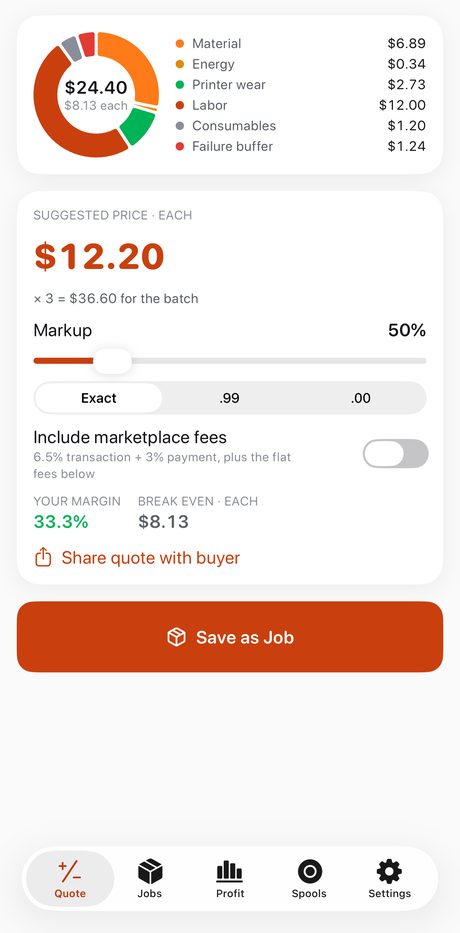
The cost breakdown donut showing material, energy, printer wear, labour, consumables and failure buffer.
The whole point

The six costs most sellers miss

Material is the one everybody counts. The other five are where the margin quietly goes.

  • Material — grams and price per kilo, purge waste included
  • Energy — print hours × wattage × your electricity rate
  • Printer wear — the machine's price spread over its working life
  • Your time — the hands-on minutes, at a rate you set
  • Consumables — the per-job odds and ends
  • Failure buffer — because some prints don't make it
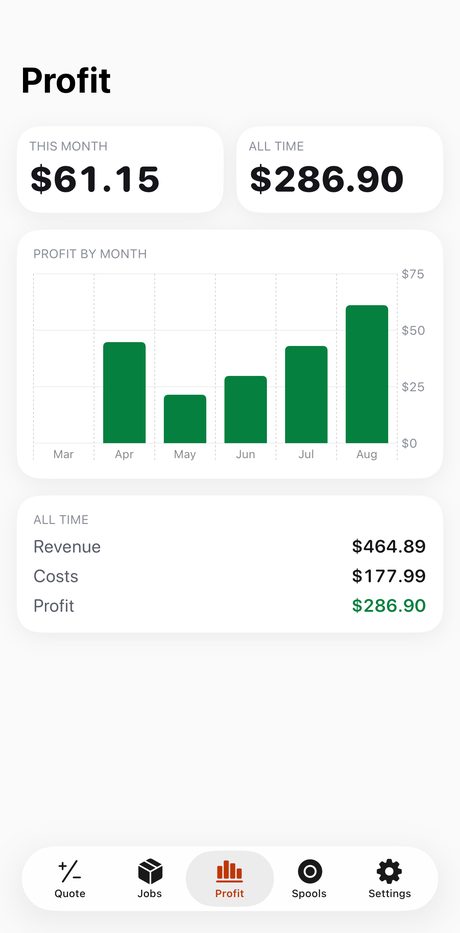
The profit dashboard showing this month, all time, and profit by month.
The honest answer

Is this actually working?

Save a quote as a job, mark it sold, and the dashboard answers the only question that matters — month by month, and all time.

  • Costs are frozen onto each job at save time, so history stays true when prices change
  • Swipe a job to printed or sold; ask Siri "How's my Spoolworth month"
  • Export every job to CSV whenever you want it elsewhere
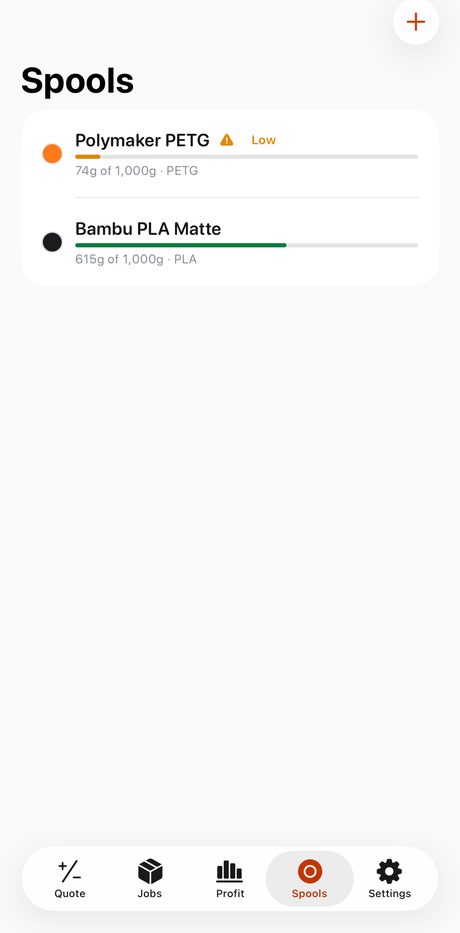
Spool inventory with remaining filament and a low-stock badge.
Never run out mid-print

Spools that keep their own count

Quote off a spool's real cost per kilo, and the grams come off automatically when the job prints. Mark a job back and the filament goes back too.

  • "Needs 412 g — only 300 g left" before you start, not after
  • Low-filament badges on the spools you're about to run out of
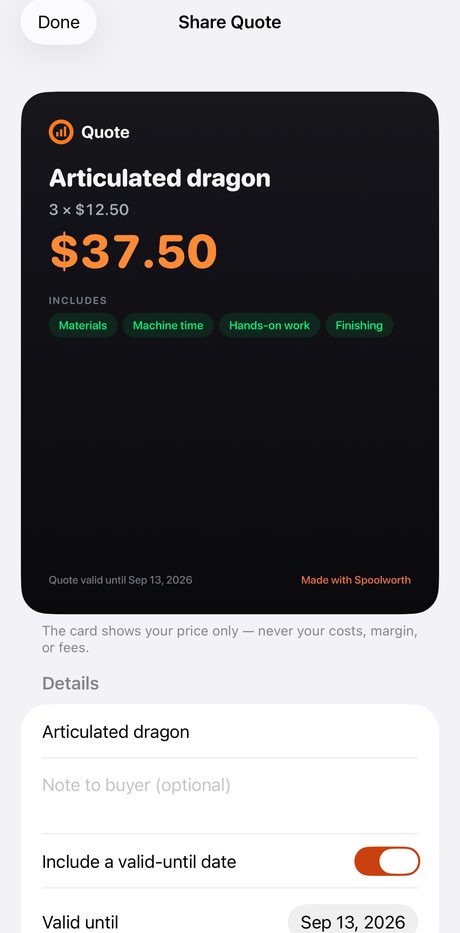
A buyer-facing quote card showing price and categories but no seller costs.
For the buyer, not about you

Send a quote that looks professional

A clean card with the price, the quantity and what's included — and none of your costs, margin or fees. That separation is enforced in code and covered by a test whose whole job is trying to leak a number.

Pricing

The calculator is free. Forever.

Quote as much as you like without paying anything. Pro is for when you start keeping records.

Free

$0

The complete calculator, slicer import, and quote sharing. Keeps your three most recent saved jobs — delete one and the slot comes back.

Spoolworth Pro

$19.99 once

Or $4.99 a year if you'd rather. Same features either way.

 FreePro
Full cost calculator and price suggestion
Slicer import and quote sharing
Saved jobs3Unlimited
Profit dashboard, month by month
Spool inventory with low-filament warnings
Quote straight off a spool's real cost
CSV export of every job
Privacy

Your numbers stay on your phone.

No account. No sign-up. No cloud sync, and no server of ours that ever sees a job, a price or a margin. Purchases are handled by Apple. Deleting the app deletes the data — export to CSV first if you want to keep it.

Read the privacy policy  ·  Support and FAQs

Find out what your prints really cost.

Free to download. iPhone, iOS 17 or later.